




PrestaShop and Base Integration: How to Connect Your Store, Allegro, and Other Marketplaces Without the Chaos


You sell in your own store and on Allegro, and maybe on Amazon too. The same product has one stock level but several places where it can be bought. When those channels aren’t connected, sooner or later you’ll sell something twice, and someone on your team will start switching off listings by hand.
Base.com, formerly known as BaseLinker, brings those channels together in one dashboard. In this article, we show how to connect PrestaShop to it, what needs to be decided before launch, and what we learned working on the project for the furniture store Furnitex.
In short: connecting the store to Base takes very little time. What matters most is deciding where stock and prices will be managed, how to match products, and what to do about unpaid orders and items that sell out between syncs.
When does Base make sense for a PrestaShop store?
If you sell exclusively through one store and your ERP handles everything else, Base may be an extra layer you don’t need. A direct integration is often simpler in that case. You’ll find a comparison of an off-the-shelf module, Base, and a custom-built solution in our article on integrating with Subiekt.
How do you connect PrestaShop to Base?
The instructions in Base’s help center are straightforward. In short, it goes like this:
One parameter worth knowing: og_delay. Base says that if orders are being pulled twice or incompletely, you can set a 5-minute delay. This helps especially when orders are pulled every minute and the store hasn’t finished saving them yet.
The Furnitex case: when the store isn’t the only system
At Furnitex, things are trickier than in a typical store. Prices come from the ERP, ERP stock is reduced by current orders in the store, and Allegro sales go through Base. So we had to set a clear division of roles.
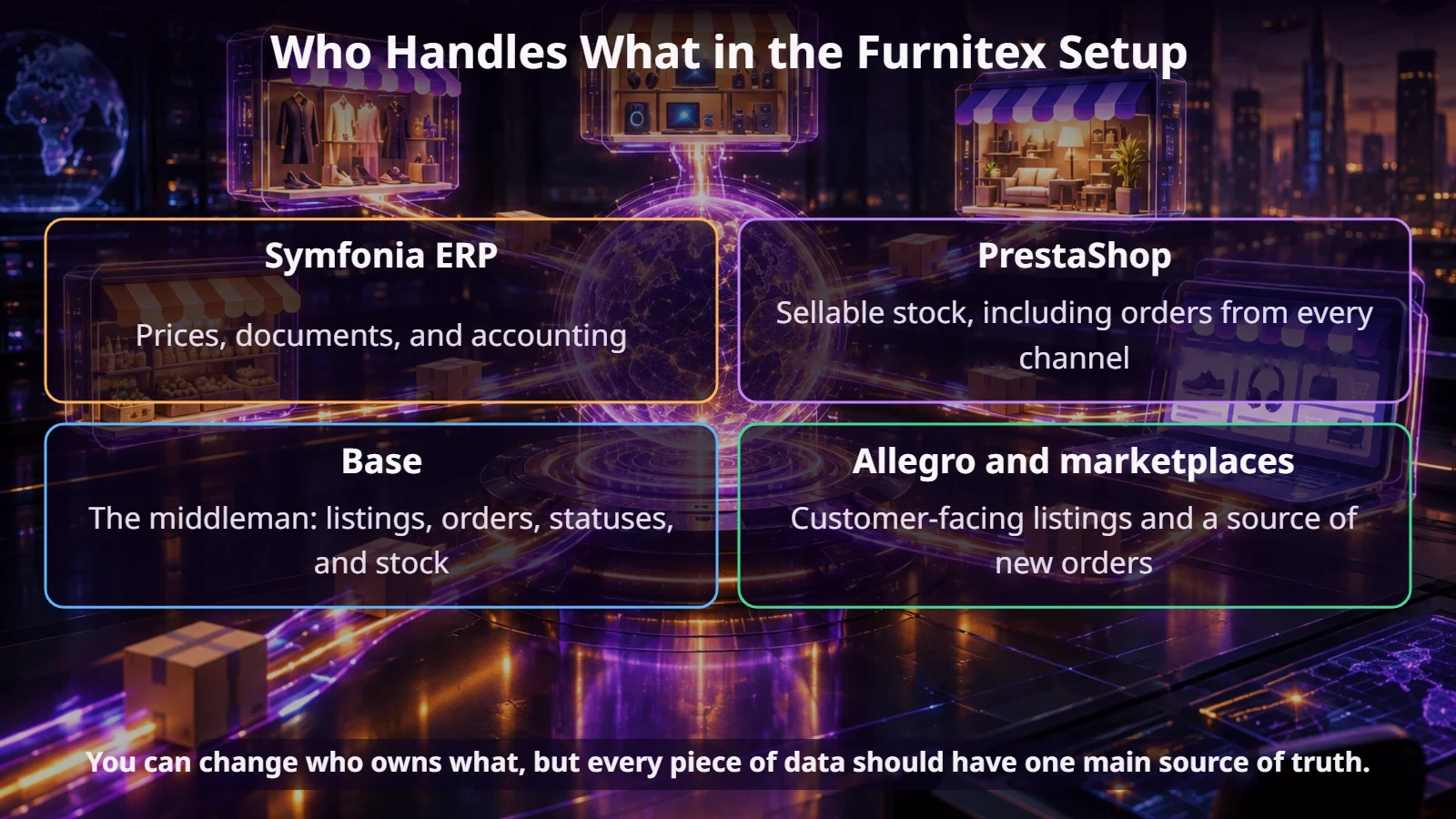
The most important decision concerns stock. PrestaShop sends it to Base, because only the store knows about all the orders that haven’t reached the ERP yet. If stock went from the ERP to Base in parallel, the marketplace would see inflated numbers. Prices, on the other hand, can go from the ERP to Base through an existing connector, so Base shouldn’t overwrite them with data from the store.
Matching products: EAN, SKU, and pitfalls
At this client, it turned out that many products had different SKUs in Base than in the store. Sometimes they differed by a space or a period, sometimes by extra text. Until then, orders had been handled manually, so nobody minded. The integration, however, required an unambiguous link.
A good approach is to do the initial matching by EAN. According to Base’s documentation, automatic matching by code creates a permanent link between the listing and the product in inventory, so the system doesn’t have to look it up again with every order. The condition is that the EANs match in Allegro, Base, the store, and the ERP. Check that before launch, not after the first failed order.
Product sets are a separate issue. A table on Allegro has to be linked to its components, or the stock levels for tabletops and legs won’t add up. This work in Base and on the listings can take several weeks, so build it into your timeline.
The ECOMPLUS+ team
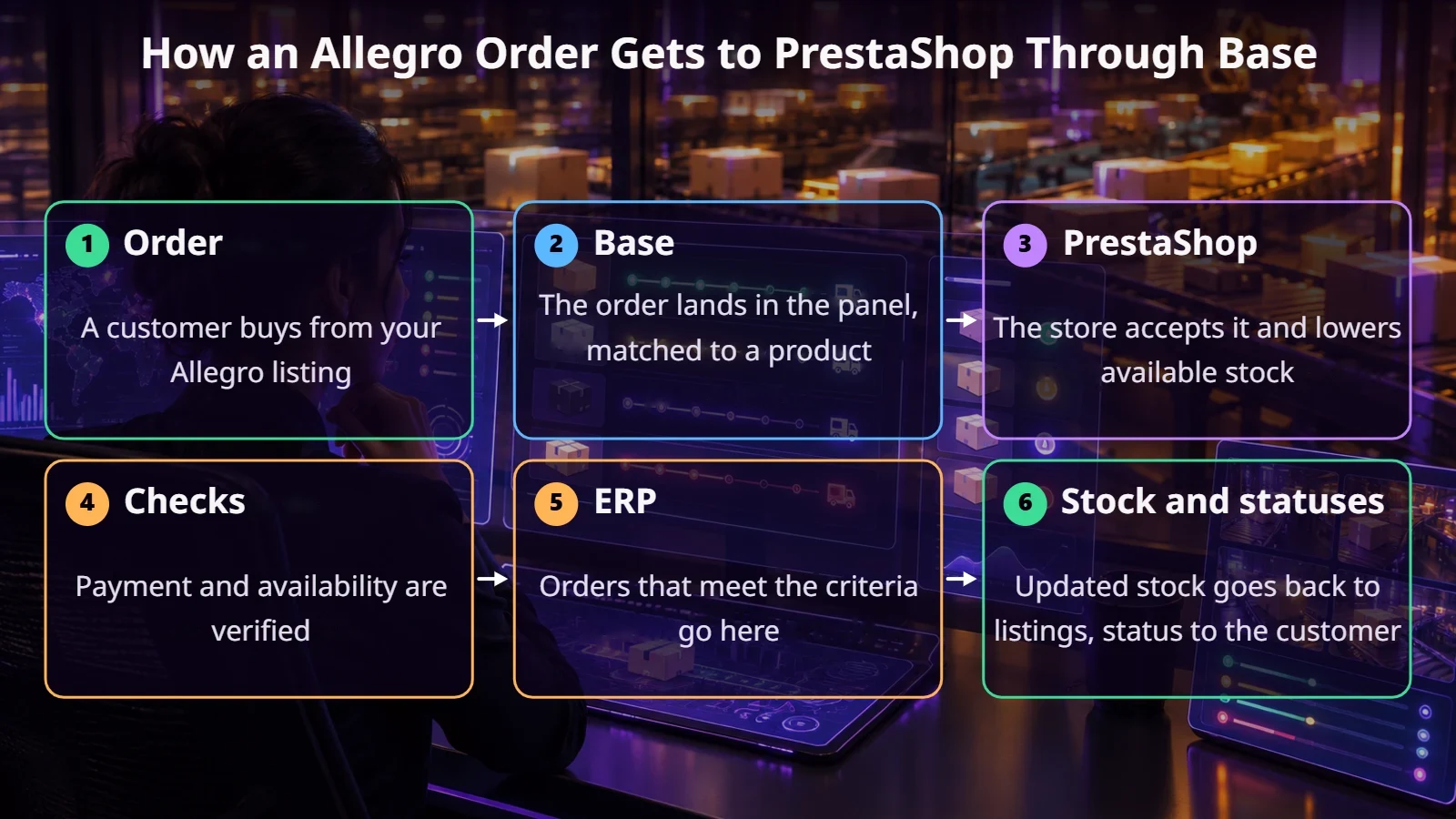
How does a marketplace order flow?
An order travels a longer path than it seems at first glance. In the Furnitex model, it looks like this:
Three decisions to make up front
Unpaid orders. Should they go to the store? At Furnitex, we’re considering a setup where all orders go into PrestaShop, but only paid ones go to the ERP. You also need to check the statuses after a failed payment, for example by card.
Status mapping. Orders from different platforms can get different statuses even with similar payments. So write down which status in Base corresponds to which one in the store, and test it on real cases: a paid order, a failed payment, and a later payment. It’s also worth assigning orders from Base to a separate customer group in the store, so they’re easy to tell apart and don’t get mixed up with guest orders.
Sales between syncs. Orders are pulled on a schedule, in this project roughly every 10 minutes. In that window, the last unit can sell in another channel. You need to decide what happens then: hold the order, notify staff, or keep a safety buffer on the marketplace.
What Base won’t solve
Summary
Connecting PrestaShop with Base is a good way to manage multiple channels, but the technical connection is the easy part. The rest is dividing up roles, the quality of your product codes, rules for unpaid orders, and a plan for out-of-stock items. Sort those out and you’ll save yourself a lot of manual fixes.
If you’re planning to sell on marketplaces or your current integration is giving you trouble, get in touch. We’ll walk through how stock and orders flow in your business and point out what’s worth changing.
FAQ
Are Base and BaseLinker the same thing?
Yes, Base.com is the current name of the system formerly known as BaseLinker.
Where should stock be managed: in the store or in Base?
Wherever you have the most complete picture of sales. Base lets you set the sync direction, so choose one primary source.
Does PrestaShop need a plugin for Base?
Base’s instructions recommend installing an extension plugin that matches your store version, in addition to the API key.
How do you match products in Base?
Usually by EAN or SKU. Always check that codes match across all systems before turning on automated sales.