




PrestaShop and Symfonia ERP Integration: How to Plan It So It Just Works


This article is based on a project the ECOMPLUS+ team is running for the furniture store Furnitex. We show how we connect PrestaShop with the Symfonia ERP system and which decisions need to be made before the first line of integration code is written.
At Furnitex, a piece of furniture’s availability isn’t a single number. There’s stock in the local warehouse. There are incoming shipments, meaning goods on their way from China. There are deliveries that arrive incomplete or late, and there are customer returns. If the integration doesn’t account for all of that, the store will sell something it doesn’t have, or stop selling something that’s about to arrive at the warehouse.
In short: a good PrestaShop–Symfonia integration starts with deciding which system owns which piece of information, how products and customer accounts are matched, and at what point an order should go to the ERP. Only then do you build the data flows on top of that.
Starting point: how Furnitex sells
Furnitex serves business customers and imports a large share of its goods from China. The purchase order to the supplier is created in Symfonia about three months before delivery. From that moment on, customers want to buy that furniture, even though it doesn’t physically exist yet.
The second feature of this model is shipping. Customers don’t order once and wait for the courier. They place several orders over a few days and agree on the ship date with the store’s staff. On top of that, there are product sets, individual trade terms, and a warehouse that works with pallets.
A simple “stock from the ERP to the store” sync isn’t enough here. Symfonia knows what’s sitting in the warehouse, but it doesn’t yet know about orders waiting in the store for a shipping decision. That’s why the first design decision was splitting up the roles.
Which system is responsible for what?
We decided that all orders, including those taken by phone or in the showroom, are recorded in PrestaShop. Only then does the store have a complete picture of what’s already been reserved.
This split has one consequence you need to know about from the start: the stock shown in the store is sometimes lower than the stock in Symfonia. That’s not a bug. The difference comes from orders reserved in the store that haven’t gone through the warehouse yet.
What data flows between PrestaShop and Symfonia?
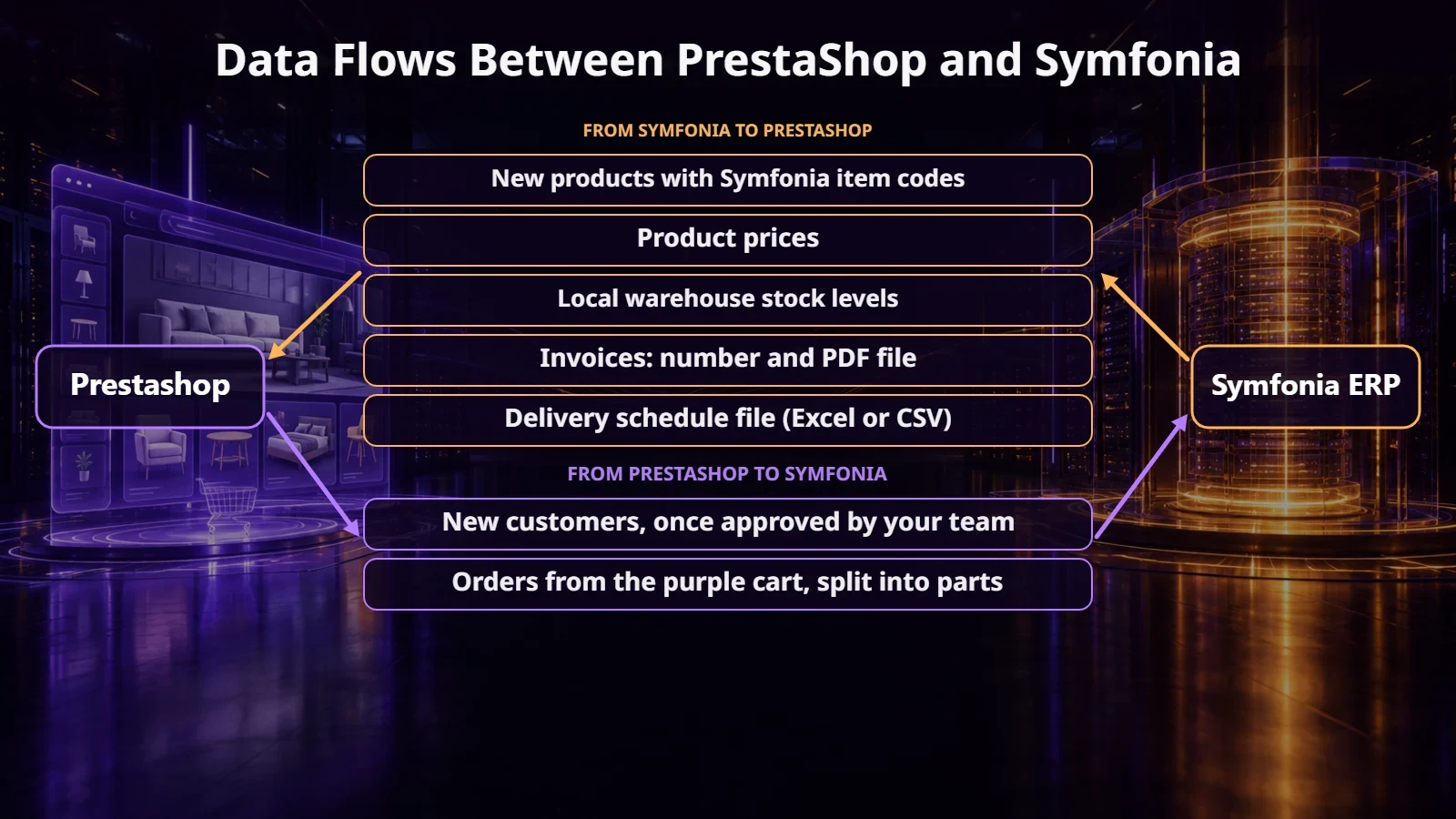
Once the roles are clear, you can map out the data moving between the systems. Most of it flows from Symfonia to the store. In the other direction, only new customer accounts and orders ready for fulfillment go back. The diagram below shows the whole setup, and the following sections cover the most important parts.
A shared product code and product sets
Every data flow needs a shared key. In the old store, the SKU field could repeat, and product sets had SKUs stitched together from several codes. That’s why we match products in PrestaShop to Symfonia by the ERP product code.
A new product created in Symfonia should appear in the store automatically, but as inactive. The ERP has no images, descriptions, or categories. Staff fill in that data and only then turn the product on for sale.
Product sets are a separate topic. The customer buys a table, but Symfonia only knows the tabletop and the legs. So the store keeps the set’s components and calculates its availability from the component stock: a table made of a tabletop and four legs is available as many times as there are enough of both parts. In their account, the customer sees a table. The warehouse and Symfonia see the components.
Where stock levels come from: deliveries, incoming shipments, and returns
Product stock at Furnitex depends on where the goods are in their journey. The diagram below shows this cycle, from the supplier order to a customer return.
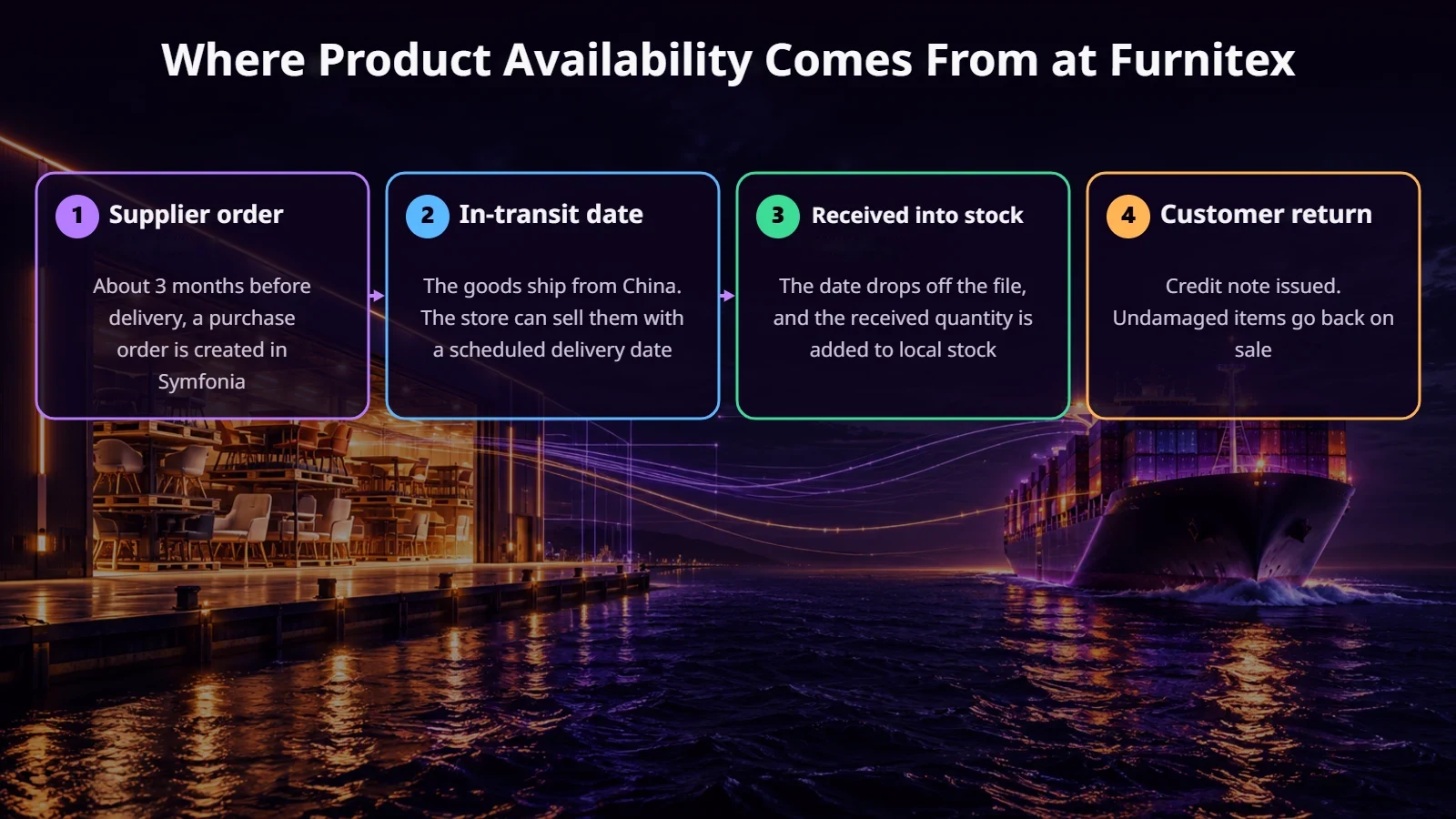
Incoming shipments. Information about goods in transit reaches the store from an Excel or CSV file: which product, how many units, and when. The import compares the file with the data in PrestaShop. It adds new dates, updates changed ones, and removes any that are no longer in the file.
Receiving a delivery. An incoming date doesn’t turn into stock automatically when the date arrives, because a ship from China can be late. The signal is the goods being received in Symfonia. It also happens that 30 chairs arrive instead of 50. In that case, we apply a queue rule: the available units go to the oldest orders first, and the rest wait for the next delivery.
Returns. The courier brings the goods back, a credit note is issued, and if the furniture isn’t damaged, it goes back on sale. The return process itself stays in Symfonia. For the integration, it simply means more stock, which can be used to fill orders waiting for that product.
What happens when a customer orders 50 tables?
Let’s say there are 10 tables in the warehouse, 10 more are coming in each of the next two deliveries, and a customer wants 50. The store doesn’t reject the order. It splits it by availability and immediately reserves the right quantities.
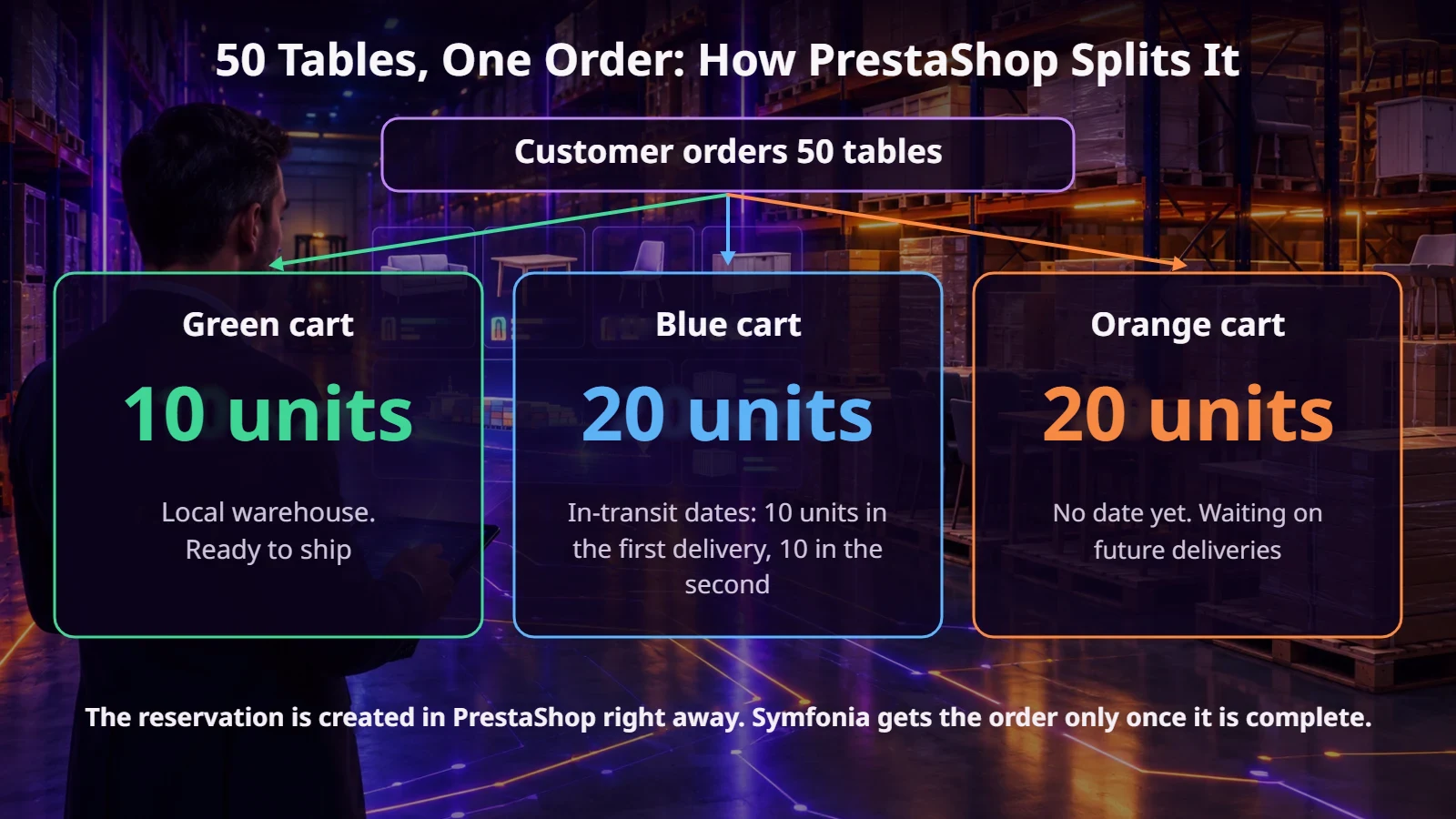
In this system, the “baskets” aren’t a shopping cart. They’re a way of grouping orders for staff and in the customer’s account. Green means goods in the warehouse, blue means incoming shipments, and orange means goods with no delivery date. Further orders from the same customer land in the same groups instead of creating separate shipments. A customer who needs the goods right away can choose 48-hour shipping. That order goes into a separate yellow basket and can only include products from the local warehouse.
We use up incoming shipments starting with the earliest. When an order spans two deliveries, the customer should see the date of the later one, because that’s when they’ll have everything.
The ECOMPLUS+ team
An order’s path to Symfonia: from the green basket to the invoice
This is the biggest difference compared to simple integrations. The order doesn’t go to Symfonia the moment it’s placed. First, the goods have to pass through the warehouse staff’s hands.
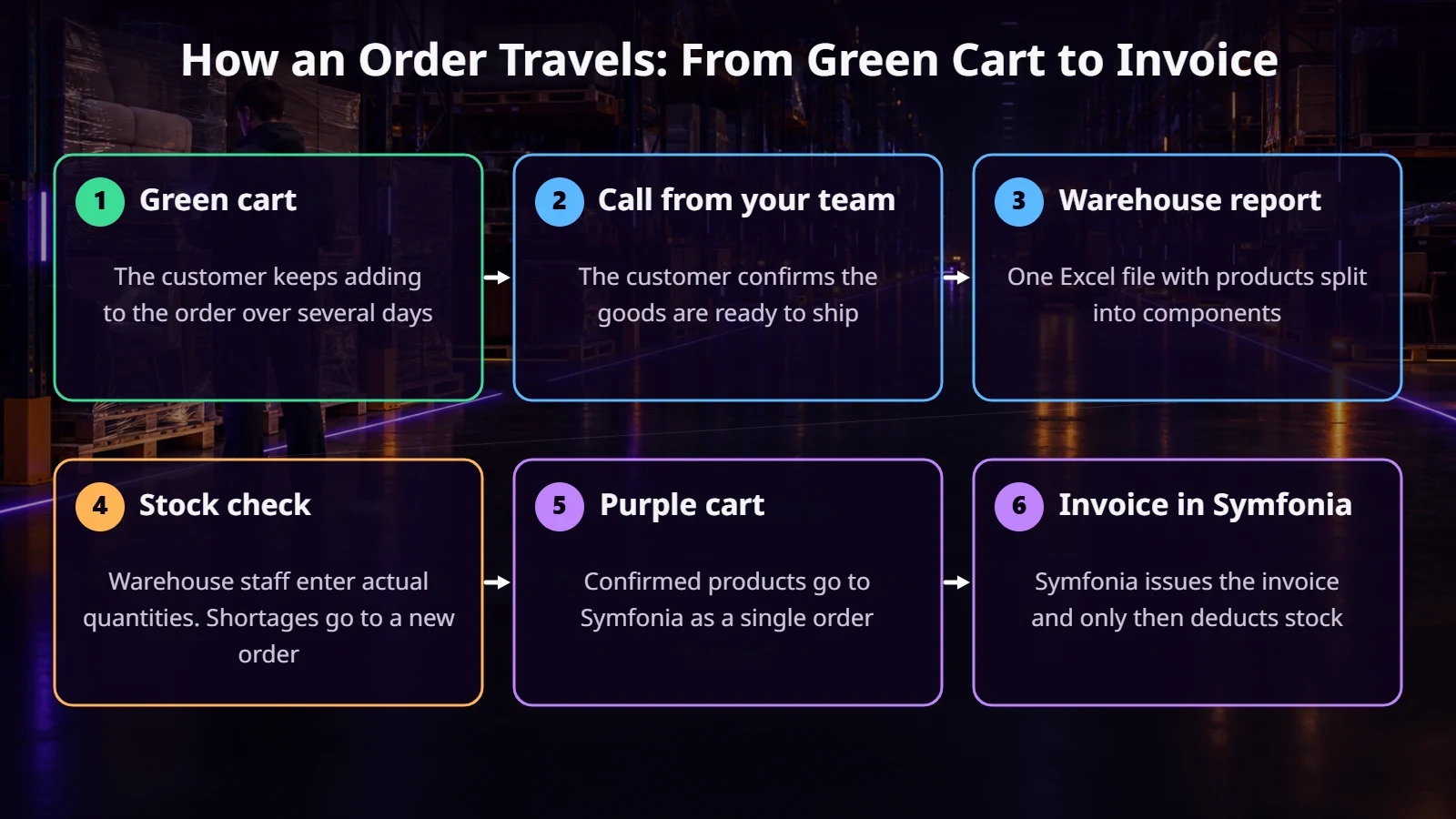
Stock in the system is theoretical; the warehouse shows the truth. If the report says 200 chairs and there are 180 on site, the warehouse worker enters the real quantity. The missing 20 units go into a new order. Confirmed products form a purple basket, which goes to Symfonia as a single order, with product sets already broken down into components.
Only at this stage is the invoice created and the stock in Symfonia reduced. The order also disappears from the pending list, so the warehouse doesn’t see it again in the next report.
Customer accounts: email, tax ID, and customer code
PrestaShop identifies a customer by email address, and Symfonia by customer code. The tax ID (NIP) doesn’t help, because in Symfonia the same company can have several customer records with different shipping addresses. So we planned sign-up in stages.
Invoices and payments in the customer account
The invoice number and PDF from Symfonia are available with the order in the customer’s account. Customers don’t have to ask staff for a copy.
We deliberately don’t map payment methods. At Furnitex, every customer has terms assigned in Symfonia, for example a bank transfer due in 7 days, and those are what go on the invoice. Here, less code means fewer things that can break.
The next step is showing unpaid invoices. Before you build it, decide what to do about partial payments. That determines whether a status is enough or whether you’ll need the remaining balance.
How do you test the integration without putting data at risk?
The integration creates real documents in Symfonia, so we work on a clone of the environment with production data. We use it to test scenarios one by one, for example an order for 10 chairs, followed by a test with a real customer.
The second thing is a complete event log. Every sync and reservation leaves a trail: when it happened, what data came in, and how the stock changed. When a discrepancy shows up, you can find the cause without guessing.
When doesn’t such an advanced integration pay off?
The model described here addresses Furnitex’s specific needs. Not every store has to copy it.
What to ask before the project starts
Summary
A PrestaShop–Symfonia integration is, above all, a description of how your business really works: where the goods come from, who decides on shipping, and when the invoice is created. At Furnitex, we’re refining some of the rules, such as moving orders after an incomplete delivery, together with the client on real cases. That’s exactly why we spend so much time on analysis before writing code.
If you’re planning to connect your store with Symfonia, get in touch. We’ll walk through your order process and tell you straight what’s worth automating and what to leave for later.
FAQ
Does PrestaShop have a ready-made Symfonia integration?
There are ready-made modules and connectors, but with incoming shipments, product sets, and individual trade terms, you usually need a solution tailored to your company’s process.
Do stock levels in the store and in Symfonia always have to match?
Not always. If orders are waiting in the store to be picked, stock in PrestaShop will be lower, because Symfonia only deducts the goods once fulfillment is confirmed.
When should an order go to Symfonia?
It depends on your sales model. At Furnitex, it happens after the warehouse checks the goods. In a simple store, it can be the moment the order is placed.
What about customers who already exist in Symfonia?
Their accounts should be linked to the store by customer code instead of being created from scratch. Otherwise, you’ll end up with duplicates and a split document history.